Hey there! I am Pradeep Chitroliya I am a Devops engineer, started writing articles on my DevOps and cloud journey. My purpose is to share the concepts that I learn, the projects that I build, and the tasks that I perform regarding DevOps. Hope you all find it useful.
What is karnel.
Linux Kernel is the heart of Linux operating systems. It is an open-source (source code that can be used by anyone freely) software that is most popular and widely used in the industry as well as on a personal use basis. Who created Linux and why? Linux was created by Linus Torvalds in 1991 as a hobby project. Since then, many of the users have contributed to its growth and development of it. Before Jumping directly to the main topic “Linux Kernel” one must know a few concepts (prerequisites) to better understand the Linux Kernel.
What is Shell:-
A shell is special user program which provide an interface to user to use operating system services. Shell accept human readable commands from user and convert them into something which kernel can understand. It is a command language interpreter that execute commands read from input devices such as keyboards or from files. The shell gets started when the user logs in or start the terminal.
What is Linux Shell Scripting?
Linux shell scripting refers to the process of writing and executing a series of commands in a shell to perform various tasks and automate processes on a Linux operating system. A shell is a command-line interpreter that allows users to interact with the operating system by typing commands. Linux offers various shells, such as Bash (Bourne Again SHell), C Shell, Korn Shell, and others, each with its own syntax and capabilities.
Linux shell scripts can be used to perform a wide range of tasks, including:
Automating system administration tasks such as backups, user management, and system maintenance.
Managing and manipulating files and directories.
Executing commands and programs with specific parameters.
Handling and processing text data using various text-processing tools available in the shell.
Controlling and managing processes and services running on the system.
Creating custom utilities and tools for specific tasks.
The Shebang #!/bin/bash
The shebang, represented by , is the first line of a shell script. It tells the system which interpreter to use to execute the script. In this case, specifies that the Bash shell should interpret the script. Bash (Bourne-Again Shell) is one of the most widely used shells and is available on many Unix-like operating systems.
You can specify a different shell interpreter, such as , using . While this is valid, keep in mind that the actual behavior might vary depending on the system and shell installed. It's a good practice to use to ensure consistency.
Tasks
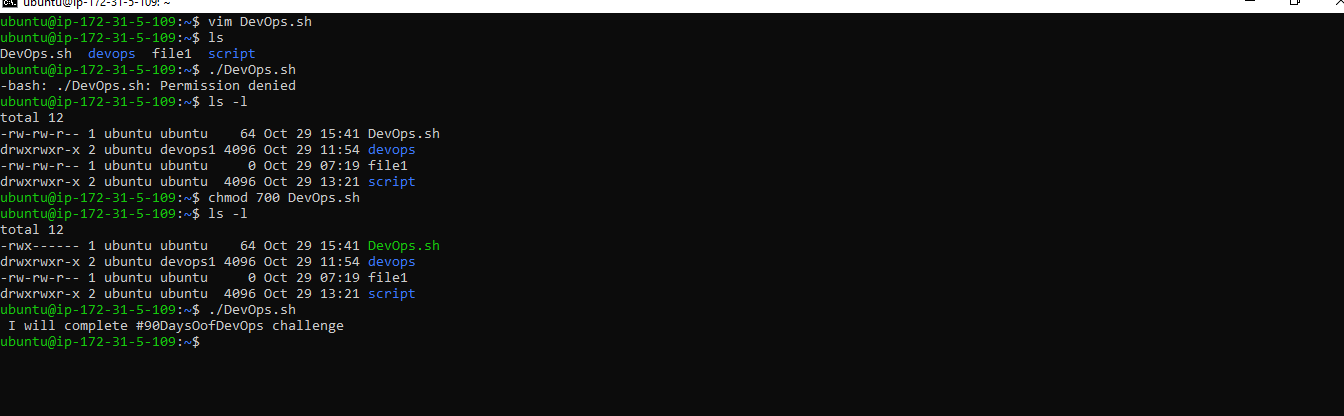
First, create a File name DevOps.sh ( shell scripting extension it should be .sh)
To run this script, follow these steps:
The script will print the specified message to the terminal.
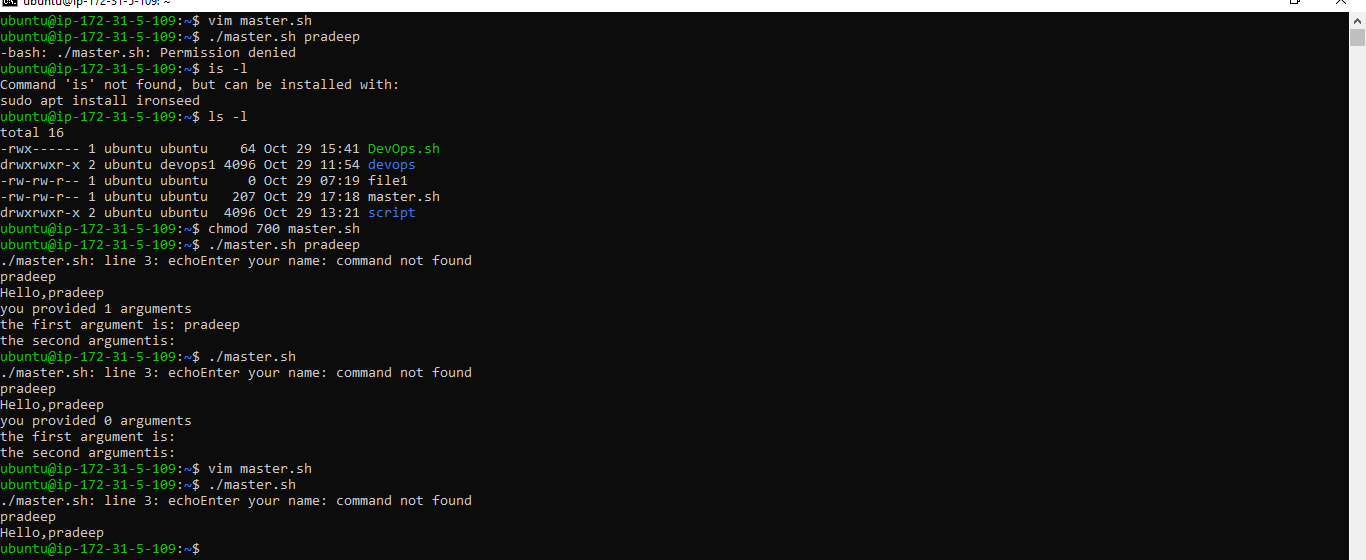
Write a Shell Script to take user input, input from arguments and print the variables.
- Write an Example of If else in Shell Scripting by comparing 2 numbers
Conditional statements, such as if-else constructs, are vital in shell scripting for making decisions and responding to different situations. Here's an example that compares two numbers:
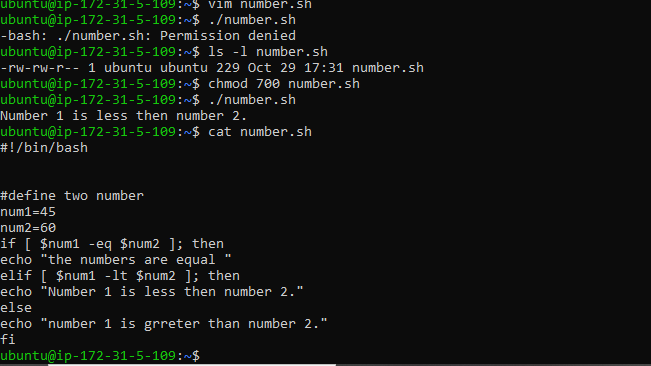
In this script, we compare num1 and num2 and print the appropriate message based on the comparison. The -eq option checks if the two numbers are equal, while -lt and -gt check if the first number is less than or greater than the second, respectively.


