Day 15 Task:Docker Volume&Docker Network
How to create docker volume and docker network
Hey there! I am Pradeep Chitroliya I am a Devops engineer, started writing articles on my DevOps and cloud journey. My purpose is to share the concepts that I learn, the projects that I build, and the tasks that I perform regarding DevOps. Hope you all find it useful.
🗼Docker-Volume
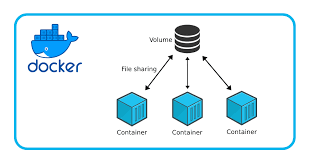
Docker allows you to create something called volumes. Volumes are like separate storage areas that can be accessed by containers. They allow you to store data, like a database, outside the container, so it doesn't get deleted when the container is deleted. You can also mount from the same volume and create more containers having same data.
🗼Volumes have several advantages:
1.Volumes are easier to back up or migrate than bind mounts.
2.You can manage volumes using Docker CLI commands or the Docker API.
3.Volumes work on both Linux and Windows containers.
4.Volumes can be more safely shared among multiple containers.
5.Volume drivers let you store volumes on remote hosts or cloud providers, encrypt the contents of volumes, or add other functionality.
6.New volumes can have their content pre-populated by a container.
7.Volumes on Docker Desktop have much higher performance than bind mounts from Mac and Windows hosts.
🗼 Create and manage volumes
Create a volume: docker volume create volume name

2.List volumes:

here can see to list of volume
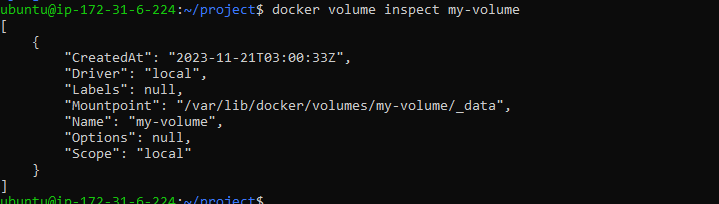
3.Inspect a volume: docker volume inspect volume name
Remove a volume: docker volume rm volume name
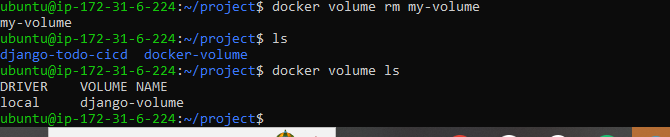
here can see hwo to remove volume
How to bind volume the host machine /home/ubuntu/project/docker-volume/docker-vol.

here can see how to bind the volume host
How to attach the volume during the run the container

Here can see how to run the container and attach the volume
Docker Network
Docker allows you to create virtual spaces called networks, where you can connect multiple containers (small packages that hold all the necessary files for a specific application to run) together. This way, the containers can communicate with each other and with the host machine (the computer on which the Docker is installed). When we run a container, it has its own storage space that is only accessible by that specific container. If we want to share that storage space with other containers, we can't do that.
🗼What are the network models of Docker?
bridge. Bridge networks create a software-based bridge between your host and the container. ...
host. Containers that use the host network mode share your host's network stack without any isolation. ...
overlay. Overlay networks are distributed networks that span multiple Docker hosts. ...
ipvlan. ...
macvlan.
How to check network

How to create network



