Day 31 Task: Launching your Kubernetes Cluster with Deployment
P
Hey there! I am Pradeep Chitroliya I am a Devops engineer, started writing articles on my DevOps and cloud journey. My purpose is to share the concepts that I learn, the projects that I build, and the tasks that I perform regarding DevOps. Hope you all find it useful.
What is Deployment in k8s
A Deployment provides a configuration for updates for Pods and ReplicaSets.
You describe a desired state in a Deployment, and the Deployment Controller changes the actual state to the desired state at a controlled rate. You can define Deployments to create new replicas for scaling, or to remove existing Deployments and adopt all their resources with new Deployments.
Task-1:
Create one Deployment file to deploy a sample todo-app on K8s using "Auto-healing" and "Auto-Scaling" feature.
1. Create one Deployment file to deploy a sample todo-app on K8s using "Auto-healing" and "Auto-Scaling" feature.
Add a deployment.yml file.
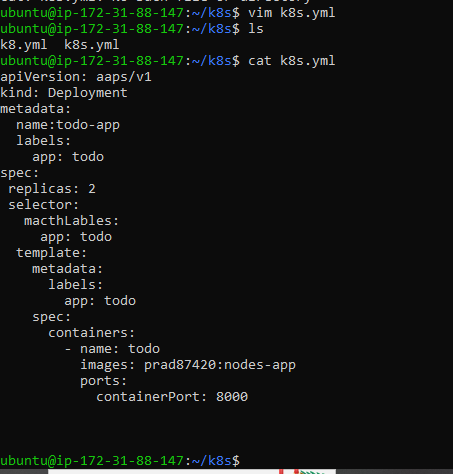
This deployment file will create a deployment with 2 replicas of a container named todo. The container is based on the image sayalishewale/ddjango-todo-app:latest, which should be replaced with the actual image name of your application. The container listens on port 8000. The deployment is associated with a label app: todo, which is used in the selector to identify the pods that belong to the deployment.
Apply the deployment to your k8s (minikube) cluster
- apply the deployment to your k8s (minikube) cluster by command
kubectl apply -f deployment.yml
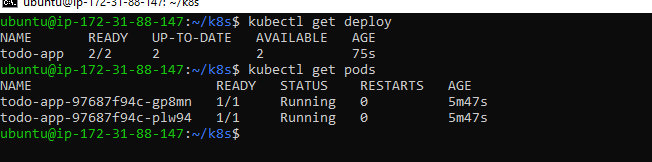
To list a deployment: using the command kubectl get deploy

To list a pods:
here deployment file create a 2 replicas of a container
Thanks for read my blog if you liked it this blog please like and commend.
Contact me on linkedin
check out my GitHub for more resource GitHub


