Day 34: Mastering ConfigMaps and Secrets in Kubernetes🔒🔑
Hey there! I am Pradeep Chitroliya I am a Devops engineer, started writing articles on my DevOps and cloud journey. My purpose is to share the concepts that I learn, the projects that I build, and the tasks that I perform regarding DevOps. Hope you all find it useful.
1. What are ConfigMaps and Secrets in k8s:
In Kubernetes, ConfigMaps and Secrets are used to store configuration data and secrets, respectively. ConfigMaps store configuration data as key-value pairs, while Secrets store sensitive data in an encrypted form.
- Example :- Imagine you're in charge of a big spaceship (Kubernetes cluster) with lots of different parts (containers) that need information to function properly. ConfigMaps are like a file cabinet where you store all the information each part needs in simple, labeled folders (key-value pairs). Secrets, on the other hand, are like a safe where you keep the important, sensitive information that shouldn't be accessible to just anyone (encrypted data). So, using ConfigMaps and Secrets, you can ensure each part of your spaceship (Kubernetes cluster) has the information it needs to work properly and keep sensitive information secure! 🚀
ConfigMaps;
A ConfigMap is an API object used to store non-confidential data in key-value pairs. Pods can consume ConfigMaps as environment variables, command-line arguments, or as configuration files in a volume.
A ConfigMap allows you to decouple environment-specific configuration from your container images, so that your applications are easily portable.
write a ymal ffile for smps.ten applyu it on culster demand.
Task 1:
Create a ConfigMap for your Deployment.
we have create configmap suing below command::
kubectl create configmap <configmap name> --from-file=<read file>

Create a ConfigMap for your Deployment using a file or the command line
kubectl create configmap <configmap name> --from-file=<read file> -n nameaspace

Update the deployment.yml file to include the ConfigMap
  apiVersion: apps/v1
  kind: Deployment
  metadata:
    name: todo-deployment
    labels:
      app: todo-app
  spec:
    replicas: 1
    selector:
      matchLabels:
        app: todo-app
    template:
      metadata:
        labels:
          app: todo-app
      spec:
        containers:
          - name: todo-app
            image: 'prad87420/toda-node-app'
            ports:
              - containerPort: 8000
            envFrom:
              - configMapRef:
                  name: devops5
Apply the updated deployment using the command:
kubectl apply -f deployment.yml -n <namespace-name>
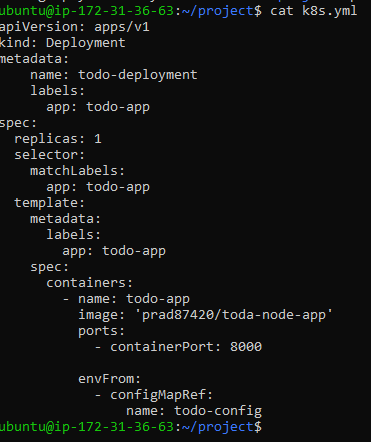
Verify that the ConfigMap has been created by checking the status of the ConfigMaps in your Namespace.

Secrets;
A Secret is an object that contains a small amount of sensitive data such as a password, a token, or a key. Such information might otherwise be put in a Pod specification or in a container image. Using a Secret means that you don't need to include confidential data in your application code.
Because Secrets can be created independently of the Pods that use them, there is less risk of the Secret (and its data) being exposed during the workflow of creating, viewing, and editing Pods. Kubernetes, and applications that run in your cluster, can also take additional precautions with Secrets, such as avoiding writing sensitive data to nonvolatile storage.
Task 2:
Create a Secret for your Deployment

Create a Secret for your Deployment using a file or the command line

Update the deployment.yml file to include the Secret
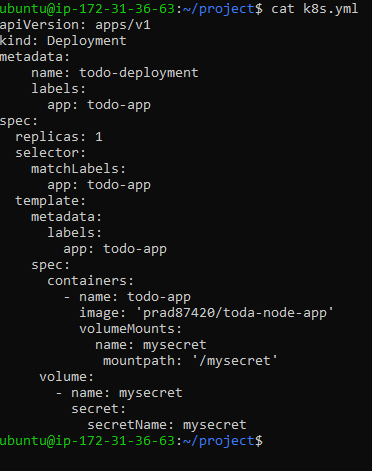
Apply the updated deployment using the command:
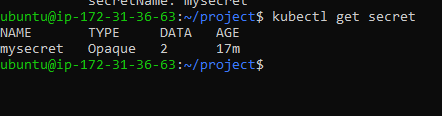
kubectl apply -f deployment.yml -n <namespace-name>Verify that the Secret has been created by checking the status of the Secrets in your Namespace.
Thanks for read my blog if you liked it this blog please like and commend.
Contact me on linkedin
check out my GitHub for more resource GitHub


